

Editorial Disclaimer: Smart Update24 verifies information through official websites, government notifications, and trusted sources before publication. Our team also conducts independent research and analysis to provide accurate information to readers; however, users are advised to verify important details from the respective official websites for final confirmation.
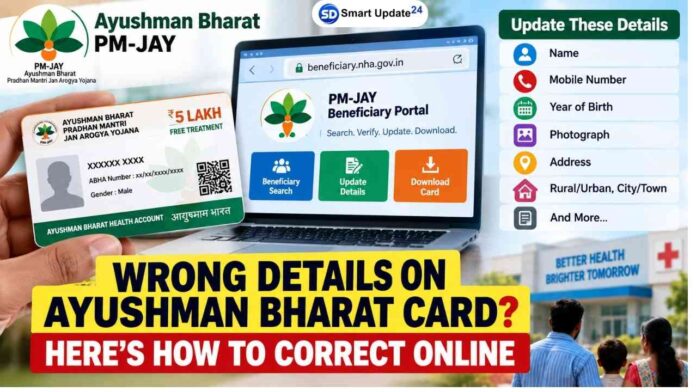
Ayushman Bharat Card Correction Online: After downloading the Ayushman Bharat PM-JAY card if there are errors in the name, year of birth, mobile number, address, or any other information, the process for correction can be initiated through the Beneficiary Portal. If noticed an incorrect name, mobile number, year of birth, address or other personal details, you may be able to initiate the correction process through the official PM-JAY Beneficiary Portal.

The National Health Authority (NHA) recognises beneficiaries’ rights to request correction of personal data when it is inaccurate or incomplete.
For eligible beneficiaries, the process starts online through the official portal:

Ayushman Bharat Card Correction Online: What details can be checked or corrected?
Depending on the options available for your beneficiary record, you may be able to update details such as:
- Name or personal information
- Mobile number
- Year of birth
- Photograph
- Address
- State and district
- Block or ULB
- PIN code
- Rural or urban details
- City or town information
The exact fields available for correction can depend on the beneficiary record and the portal’s current functionality.
Step 1: Visit the official Beneficiary Portal
Start by opening the official PM-JAY Beneficiary Portal (https://beneficiary.nha.gov.in/)
You will need to log in using the details requested by the portal. The process may involve your registered mobile number and OTP-based authentication.
Important: Always use the official NHA/PM-JAY website for this process. Avoid entering Aadhaar, OTP or other personal information on websites claiming to provide Ayushman card correction services.
Step 2: Select the beneficiary
After logging in, identify the family member whose Ayushman Bharat card information needs to be corrected.
The portal may ask for relevant identification details, including Aadhaar-related information and captcha verification, before displaying the beneficiary record.
Before making any changes, carefully check whether the information shown on the screen is actually incorrect.
Step 3: Open the card and complete authentication
Select the relevant family member and open the Download Card option.
The process shown in the guide includes authentication using Aadhaar OTP and mobile OTP. Complete the required authentication before proceeding.
This step is important because the PM-JAY ecosystem handles sensitive personal and health-related information. NHA’s privacy policy states that Aadhaar-based authentication requires explicit consent and that beneficiary personal data must be protected.
Step 4: Look for the “Update Card” option
Once the beneficiary’s card information is displayed, check the card status.
If the “Update Card” option is available, select it to begin the correction process.
You may then need to select the particular beneficiary whose information needs to be updated.
Step 5: Enter the correct information
The correction form can contain fields related to personal and contact information.
Depending on what is available for the beneficiary record, check and update the required details, such as:
Mobile Number: Verify the mobile number through the required verification process.
Photograph: Update the photograph if the option is available.
Year of Birth: Check that the year of birth matches the relevant official record.
Address: Check the state, district, block/ULB, PIN code and other address information.
Rural/Urban and City/Town: Enter the appropriate location details wherever required.
Before submitting, carefully review every field. A small mistake in the correction form could result in incorrect information being retained in the record.
Step 6: Submit the correction request
After checking all the information, click Submit.
Do not close the page or refresh it while the submission is being processed.
If the update is successfully completed, the portal can display a confirmation message such as “Update Card is completed.”
Step 7: Log in again and verify the changes
After receiving the successful update message, log in to the portal again.
Check the beneficiary details once more to confirm that the requested changes have been reflected correctly.
This is an important step because it allows you to identify any remaining errors before downloading the updated card.
Step 8: Download the updated Ayushman card
Once the corrected information is visible, download the latest version of the Ayushman Bharat card.
The updated card should reflect the corrected information where the change has been successfully processed.
Keep the new digital copy safely for future use.
How long does the update take?
The time required for an update can depend on the type of correction and the verification or approval process involved. The guide indicates that an updated record may become visible on the portal after the correction is processed.
Therefore, do not assume that every correction will appear immediately. Always check the beneficiary record again after submitting the request.
Ayushman Bharat Card Correction Online: What if the correction option is not available?
Not every field or beneficiary record will necessarily have the same update options.
If you cannot find the Update Card option, the required field is locked, or the correction is not being accepted, do not try to modify information through an unofficial website or third-party service.
Instead, use the official PM-JAY support or grievance channels for assistance. NHA’s privacy policy also provides for beneficiary complaints and requests relating to personal data.
Be careful with Aadhaar and OTP information
An Ayushman Bharat card contains personal information, so users should be particularly careful while attempting an online correction.
Never share your Aadhaar OTP, mobile OTP, password or other authentication information with another person.
NHA’s privacy framework specifically emphasises the security and confidentiality of beneficiary information and Aadhaar numbers.
Ayushman Bharat Card Correction Online: Quick Checklist
Before submitting an update request, check:
- Name
- Mobile number
- Year of birth
- Photograph
- Address
- State and district
- Block/ULB
- PIN code
- Rural/Urban details
- City/Town
- Beneficiary status
After submitting:
Submit → Check confirmation → Log in again → Verify details → Download updated card
A mistake on an Ayushman Bharat card can create unnecessary confusion when the card is needed. The official Beneficiary Portal provides a digital route for beneficiaries to check their records and, where the relevant option is available, request corrections.
The safest approach is to use only the official PM-JAY portal, carefully verify every detail, complete the required authentication and download the card again after the update is reflected.
Official portal: beneficiary.nha.gov.in
