

Editorial Disclaimer: Smart Update24 verifies information through official websites, government notifications, and trusted sources before publication. Our team also conducts independent research and analysis to provide accurate information to readers; however, users are advised to verify important details from the respective official websites for final confirmation.
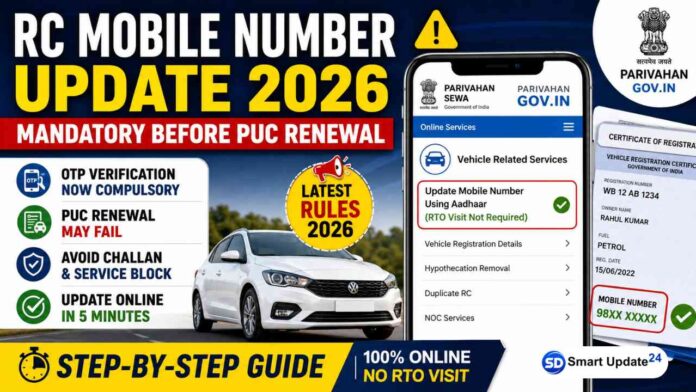
RC Mobile Number Update Online 2026: Vehicle owners across India should pay attention to an important update related to Pollution Under Control (PUC) certificate renewal. According to information shared by a pollution checking center operator from Durgapur, West Bengal, vehicle owners are increasingly facing issues while renewing their pollution certificates because the mobile number linked with their Vehicle Registration Certificate (RC) is either outdated or no longer active.
As per the latest verification process being implemented through the Parivahan system, OTP-based authentication is becoming mandatory for several vehicle-related services. In many cases, PUC renewal and verification require successful OTP validation on the mobile number registered with the vehicle’s RC.
Related Article: Hero MotoCorp to Launch India’s First Ethanol Flex-Fuel Motorcycle on June 3, 100% Ethanol Bike

If your old mobile number is no longer active, you should update it immediately to avoid any inconvenience while availing vehicle-related services.
Why Updating the Mobile Number in the RC is Important?
The mobile number linked with your vehicle’s RC is used for:
- OTP-based verification for vehicle-related services
- Pollution Under Control (PUC) certificate renewal
- Vehicle ownership transfer services
- Traffic challan notifications
- Vehicle-related alerts from transport authorities
- Fraud prevention and security verification
If the registered mobile number is inactive, you may face difficulties accessing these services online.
Related Article: RRB Paramedical Recruitment 2026: Railway Board Approves 600 Vacancies, Official Notification Expected Soon | Check Posts, Eligibility & Latest Update
Can You Update RC Mobile Number Online?
Yes. The Ministry of Road Transport and Highways has provided an online facility through the Parivahan portal that allows vehicle owners to update their mobile number linked with the RC without visiting the RTO in many cases.
The process generally requires Aadhaar-based verification and vehicle details for authentication.
Documents Required
Before starting the process, keep the following ready:
- Vehicle Registration Number
- Chassis Number
- Engine Number
- RC Registration Date
- RC Validity/Expiry Details (if applicable)
- Aadhaar Number of the registered vehicle owner
- Mobile number linked with Aadhaar
How to Update Mobile Number in RC Online
Follow these steps:
Step 1: Visit the Parivahan Portal
Open your browser and visit the official Parivahan website.
Step 2: Select Vehicle Related Services
On the homepage:
- Click on “Online Services”
- Select “Vehicle Related Services”
Step 3: Choose Your State
Select the state where your vehicle is registered.
Step 4: Log in through RTO or Vehicle Registration Number
You can proceed using:
- Vehicle Registration Number, or
- RTO Selection Method
Accept the declaration and click on “Proceed.”
Step 5: Complete eKYC Verification
The portal will display information about Aadhaar-based eKYC.
Click on “Proceed” to continue.
Step 6: Select Mobile Number Update Service
Navigate to:
Services → Vehicle Related Services → Update Mobile Number Using Aadhaar
Choose the option that allows Aadhaar-based mobile number updating without visiting the RTO.
Step 7: Enter Vehicle Details
Provide:
- Vehicle Registration Number
- Chassis Number
Click on “Verify.”
Step 8: Aadhaar Authentication
Enter the Aadhaar number of the registered vehicle owner.
- Accept the declaration
- Click “Get OTP”
- Enter the OTP received on the Aadhaar-linked mobile number
- Validate the OTP
Step 9: Enter Additional Vehicle Information
You may be asked to provide:
- Engine Number
- Registration Date
- Vehicle Validity Details
Click on “Show Details.”
Step 10: Update Mobile Number
Verify the owner’s name as per Aadhaar.
Enter the new mobile number that you want to link with the vehicle RC.
Accept the declaration and click on “Verify.”
Step 11: Submit the Request
Click on “Update Mobile Number.”
Once submitted successfully, the request is processed, and the updated mobile number is linked with the vehicle record.
A confirmation message may also be sent by the transport department.
What happens if the mobile number is Not Updated?
If the mobile number linked with your RC is inactive:
- OTP verification may fail
- Online vehicle services may become inaccessible
- PUC renewal may face verification issues
- Important vehicle notifications may not reach you
- Certain vehicle-related transactions may get delayed
Therefore, vehicle owners are advised to keep their registered mobile numbers updated in the Parivahan database.
How to Update the Mobile Number Linked with the RC
- Go to the official Vahan mobile update page:
Vahan Mobile Number Update Portal - Enter:
- Vehicle Registration Number
- Chassis Number
- Engine Number
- Registration/Fitness validity details (as applicable)
- Verify ownership details.
- Enter the Aadhaar number of the registered vehicle owner.
- Receive OTP on the Aadhaar-linked mobile number and complete verification.
- Enter the new mobile number and submit the request.
- Once verified, the new mobile number is updated in the Vahan database.
Alternative Method Through Parivahan
- Visit Parivahan Sewa
- Online Services → Vehicle Related Services
- Select your State
- Log in using Vehicle Registration Number
- Choose “Update Mobile Number Using Aadhaar”
- Complete Aadhaar OTP verification
- Update and confirm your mobile number.
Important
- The Aadhaar-linked mobile number must be active because OTP is sent to that number.
- If the vehicle ownership details and Aadhaar details do not match, you may have to visit the RTO for verification.
- Many transport departments are advising vehicle owners to keep their RC mobile number updated for vehicle-related services, alerts, challans, and other online verifications
Important Note
The exact implementation of OTP verification requirements may vary depending on the state transport authority and service being accessed. Vehicle owners should verify the latest requirements on the official Parivahan portal or with their local RTO before visiting a pollution checking center.
With vehicle services becoming increasingly digital, maintaining an active mobile number linked to your Vehicle RC has become essential. If your old number has been discontinued or changed, updating it online through the Parivahan portal can help ensure smooth access to PUC renewal, vehicle verification, challan services, and other transport-related facilities.
Vehicle owners are advised to complete the update process at the earliest to avoid last-minute issues during pollution certificate renewal or other vehicle-related transactions.
