

Editorial Disclaimer: Smart Update24 verifies information through official websites, government notifications, and trusted sources before publication. Our team also conducts independent research and analysis to provide accurate information to readers; however, users are advised to verify important details from the respective official websites for final confirmation.
PM Internship Scheme 2026 Complete Guide: The Prime Minister Internship Scheme (PMIS) provides young eligible candidates with opportunities to gain hands‑on industry experience through internships offered by participating organizations.

Under the Rolling Model, participating companies post internship opportunities regularly on the PMIS portal with defined start and end dates. Candidates can explore available opportunities, apply as per the portal rules and eligibility criteria, track their applications, and complete joining steps if selected.
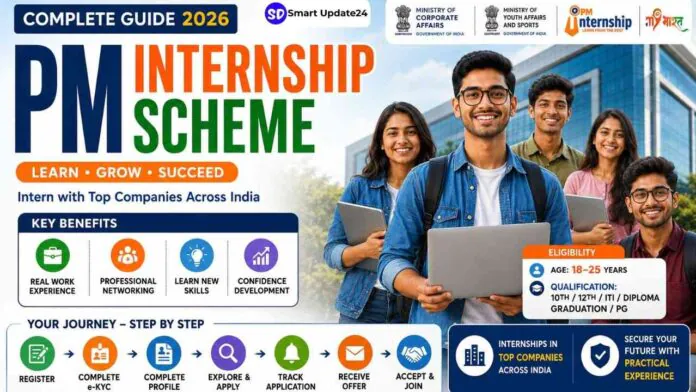
The official campaign poster highlights practical industry exposure, skill development, networking opportunities, and career growth for youth between 18 and 25 years of age.

According to the official portal, the internship initiative is being supported by the Ministry of Youth Affairs & Sports, Ministry of Corporate Affairs, and the MY Bharat platform.
What is the PM Internship Scheme?
The PM Internship Scheme is a national-level internship initiative designed to help Indian youth gain real work experience in leading industries and companies.
The main objective of the scheme is to bridge the gap between education and employment by giving young candidates hands-on industry exposure before entering the job market.
The government plans to provide internship opportunities to a massive number of youth over the coming years through partnerships with major companies across different sectors.
Key Benefits of the Internship Scheme
The promotional poster and official details mention several important benefits for candidates.
- Real Work Experience
Selected interns will get exposure to real company environments and professional work culture.
- Professional Networking
Candidates will have opportunities to connect with industry professionals and corporate teams.
- Skill Development
The internship focuses on practical learning and in-demand industry skills.
- Confidence Building
The programme is also aimed at improving communication, workplace confidence, and career readiness among young participants.
PM Internship Scheme: Eligibility Criteria
According to the details mentioned in the campaign material, eligible candidates include:
- Age group: 18 to 25 years
- Qualification:
- Class 10 pass
- Class 12 pass
- ITI
- Diploma holders
- Graduates
- Postgraduates
Official sources also mention that applicants should generally not be in full-time employment while applying for the internship programme.
Internship Duration
The poster mentions that internship opportunities may be available for:
- 6 months
- 9 months
Some official programme descriptions also mention longer internship models depending on the participating company and sector.
Internship Opportunities in Top Companies
One of the biggest attractions of the scheme is the chance to intern with major companies across Bharat (India). The programme aims to provide youth with practical corporate exposure in sectors such as:
- Banking
- Manufacturing
- IT
- Energy
- Healthcare
- Automotive
- Hospitality
- Financial services
The official PM Internship portal states that the initiative is linked with top companies across multiple sectors.
How to Apply for the PM Internship Scheme 2026
Interested candidates can apply online through the official MY Bharat portal and PM Internship website.
Official Portals:
Steps to Apply
- Visit the official portal
- Register using mobile number and basic details
- Complete profile and educational information
- Upload required documents
- Apply for available internship opportunities
Purpose of the PM Internship Scheme
The PM Internship Scheme helps young candidates gain:
- Real work experience
- Corporate exposure
- Industry skills
- Internship opportunities in top companies
The scheme operates through a rolling model where companies regularly post internship openings on the PMIS portal. Candidates can apply, track applications, receive offers, and join internships directly through the portal.
- Important Features of PMIS Rolling Model
- Browse and Apply for Internships
Companies continuously publish internship opportunities with:
- Start dates
- End dates
- Eligibility
- Benefits
- Internship duration
Candidates can explore and apply to active openings.
Internship Application Limit
A candidate can keep:
- Maximum 3 active applications at one time
Active means:
- Applied
- Shortlisted
- Waitlisted
- Selected
- Offer accepted
- Joined
If one application gets rejected, candidates can apply for another internship.
Offer Rules
Important rules:
- Maximum 2 active offers allowed
- Only 1 offer can be accepted
- Offer must be accepted within 14 days
- Otherwise the offer automatically expires
If a candidate accepts one offer and later receives another better offer, switching is allowed within 15 days.
Joining Rules
Candidates must:
- Join before reporting date
- A 14-day grace period is available
If candidates still fail to join:
- System marks them as “Did Not Report (DNR)” automatically.
Dropout and Termination Rules
Important conditions:
- If terminated during internship → permanently ineligible
- First dropout → one more chance available
- Second dropout → permanently blocked from PMIS
These rules ensure discipline and fairness in the scheme.
PM Internship Portal Overview
Official Portal:
PM Internship Scheme Portal
Candidates can access:
- Home
- Guidelines
- FAQs
- Videos
- Partner companies
- Support system
- Login/Register
- Accessibility options
- Language options
The portal also supports:
- Screen readers
- Text size control
- Multiple languages
This makes the system accessible to candidates from different backgrounds.
How to Explore Internships
Candidates can:
- Search internships by keyword
- Search by location
- Use map view
- Find nearby internships
- Filter by:
- State
- District
- Sector
- Field
The portal can detect device location and show nearby internships first.
What Candidates Can See Before e-KYC
Before verification, candidates can see:
- Internship titles
- Locations
- Qualification requirements
- Duration
- Benefits
But they cannot:
- View full internship description
- Access Apply button
- See detailed responsibilities
For full access, e-KYC is mandatory.
PMIS Buddy Virtual Assistant
The PMIS portal includes a chatbot called PMIS Buddy.
It helps candidates with:
- Registration
- Login issues
- Password reset
- e-KYC guidance
- Internship application process
- Offer management
- Complaint support
Candidates can ask questions directly inside the portal.
Registration Process
New User Registration Steps
Step 1
Click “Login/Register”
Step 2
Choose “New User/Register Now”
Step 3
Enter mobile number
Step 4
Verify OTP
Step 5
Create password
Password must contain:
- 8 characters
- Uppercase letter
- Lowercase letter
- Number
- Special character
Example:
- Password@12
After successful registration, candidates enter the Explore Internship section.
Login Process
Existing users can log in using:
- Registered mobile number
- Password
- OTP verification
If password is entered incorrectly 3 times:
- Account gets temporarily blocked for 15 minutes.
e-KYC Verification Process
e-KYC is mandatory before applying.
Candidates can complete verification through:
- Aadhaar OTP
- DigiLocker
Aadhaar e-KYC Steps
- Enter Aadhaar number
- Receive OTP
- Verify OTP
- Complete authentication
DigiLocker Verification
Candidates can also use DigiLocker if Aadhaar is linked properly.
- Personal Details Section
After e-KYC, candidates must complete:
- Name
- Guardian details
- Category
- Address
- Contact information
PIN code and email verification are also required.
PM Internship Scheme: Educational Qualification Section
Candidates must upload:
- Class 10 details
- Class 12 details
- ITI/Diploma
- Graduation
- Postgraduation
Documents required:
- Marksheet
- Certificate
- Supporting documents
Accepted formats:
- JPG
Maximum file size:
- 7 MB
Final year students can also apply.
Skills and Language Section
Candidates can select:
- Technical skills
- Software knowledge
- Communication skills
- Languages known
This helps the portal match candidates with suitable internships.
CV Builder Feature
The portal automatically creates a CV using profile information.
Candidates can:
- Edit CV
- Download CV
- Add skills
- Add certifications
- Add experience
The system is especially useful for freshers with no prior resume.
PM Internship Scheme: Application Process
Once profile completion reaches 100%, candidates can apply.
Steps:
- Open internship details
- Click Apply Now
- Confirm application
- Upload optional introduction video
- Submit declaration
- Application submitted successfully
The portal also warns candidates if:
- Qualification does not match
- Internship location is too far
Candidates can still apply if they want.
Introduction Video Upload
Candidates can upload:
- 30–45 second introduction video
- Maximum 10 MB size
Suggested content:
- Name
- Qualification
- Skills
- Internship interest
- Project/work experience
This helps companies evaluate candidates better.
PM Internship Scheme: Application Tracking System
Dashboard shows:
- Applied internships
- Remaining application count
- Application status
- Offer updates
Everything is monitored from a single dashboard.
Offer Letter and Acceptance
When selected:
- Candidates receive notification
- Offer letter becomes available
Options:
- View Letter
- Accept Offer
- Reject Offer
Important:
- Offer must be accepted within 14 days
Candidates can also switch offers within the allowed time period.
Complaints and Support System
Candidates can raise complaints related to:
- Portal issues
- Internship problems
- DBT/payment issues
They can upload:
- Screenshots
- PDFs
- Supporting documents
Complaint status can also be tracked live.
Dashboard Features
The dashboard contains:
- FAQs
- Tutorials
- Guidelines
- Partner companies
- Notifications
- Insurance section
- Allowance section
- Refer a Friend feature
- Feedback system
Everything is centralized for easier internship management.
