

Editorial Disclaimer: Smart Update24 verifies information through official websites, government notifications, and trusted sources before publication. Our team also conducts independent research and analysis to provide accurate information to readers; however, users are advised to verify important details from the respective official websites for final confirmation.
EWS Documents Checklist 2026: The Economically Weaker Section (EWS) Certificate has become an important document for candidates seeking reservation benefits in education and government job opportunities. However, many applicants believe that simply submitting the online application is enough to receive the certificate. In reality, incomplete or incorrect document submission often leads to delays or rejection of applications.

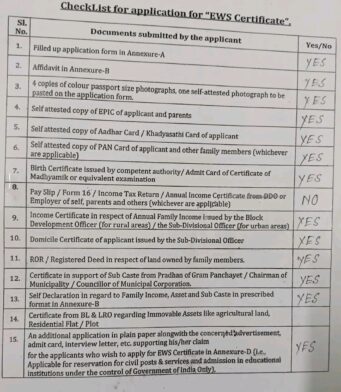
Based on the provided checklist and supporting details, applicants should carefully arrange all required documents before visiting the office for submission.
Why the EWS Certificate is Important
The EWS Certificate is issued to eligible candidates belonging to the General category who meet the government’s income and asset criteria. It allows candidates to receive reservation benefits in:

- Government jobs
- Educational institutions
- Competitive examinations
- Central Government reservation schemes
Submitting proper documents is essential for faster approval.
Complete EWS Documents Checklist
Before submitting your EWS application, ensure you have the following documents ready:
1. Application Form
- Filled in the application form in Annexure-A
2. Affidavit
- Affidavit in Annexure-B format
3. Passport Size Photographs
- Four colour passport-size photographs
- One self-attested photograph attached to the application form
4. Identity Proof Documents
Self-attested copies of:
- Applicant’s EPIC (Voter ID)
- Parents’ EPIC
- Aadhaar Card
- Khadya Sathi Card (if applicable)
- PAN Card of the applicant and family members
5. Age Proof Documents
Any one of the following:
- Birth Certificate
- Madhyamik Admit Card
- Equivalent examination certificate
6. Income Related Documents
Applicants may need:
- Salary slips
- Form 16
- Income Tax Return (ITR)
- Annual Income Certificate from the employer or DDO
Some applicants often miss this important requirement, which may create delays in processing.
7. Family Income Certificate
- Annual family income certificate issued by:
- Block Development Officer (BDO) for rural areas
- Sub-Divisional Officer (SDO) for urban areas
8. Residential Proof
- Domicile Certificate issued by SDO
9. Land and Property Documents
- Record of Rights (ROR)
- Registered land deed
- Property ownership documents
10. Supporting Caste-Related Certificate
- Certificate from Gram Panchayat, Municipality, or Councillor supporting sub-caste details if applicable
11. Self Declaration Form
Self-declaration regarding:
- Family income
- Assets
- Sub-caste information
12. BL & LRO Certificate
Certificate related to immovable assets, including:
- Agricultural land
- Residential plots
- Flats
13. Additional Supporting Documents
Applicants seeking EWS benefits for educational institutions or government recruitment may need:
- Advertisement copy
- Admit card
- Interview letter
- Additional application on plain paper
Important Points Before Submission
- All photocopies should be self-attested.
- Verify that income details remain consistent across all documents.
- Double-check names, addresses, and identification details.
- Keep both original and photocopy versions while visiting the office.
- Missing even one document may delay the certificate process.
Many EWS applications get delayed because applicants submit incomplete documents. Preparing every required paper beforehand can help speed up the process and reduce unnecessary visits to government offices. Before applying, carefully review the checklist and make sure all documents are properly arranged and attached.
EWS Certificate Document Application Form
How to Apply for an EWS Certificate?
Candidates who wish to obtain an Economically Weaker Section (EWS) Certificate can apply through both online and offline methods. The process may vary slightly depending on the rules and procedures of individual state governments. Applicants should ensure they have all necessary documents ready before beginning the application process.
Online Application Process for EWS Certificate
Applying online for an EWS Certificate is simple and convenient. Follow these steps carefully:
Step 1: Visit the Official State Portal
The EWS certificate application process is managed by the respective state government. Visit the official online portal of your state government where EWS services are available.
Step 2: Read Application Guidelines
Before filling out the form, carefully read all instructions and eligibility conditions mentioned on the portal.
Step 3: Keep Required Documents Ready
Applicants should prepare scanned copies of all required documents beforehand. Commonly required documents may include:
- Aadhaar Card
- Voter ID Card
- PAN Card
- Passport-size photographs
- Income Certificate
- Domicile Certificate
- Land or property documents
- Birth Certificate or Madhyamik Admit Card
- Self-declaration form
- Affidavit and other supporting documents
Step 4: Fill in the Application Form
Enter all details carefully, including:
- Name of applicant
- Parent details
- Address information
- Income details
- Asset information
- Contact details
Make sure all information matches your official documents.
Step 5: Upload Documents
Upload the scanned copies of the required documents in the prescribed format and file size.
Step 6: Pay Application Fee
If applicable, complete the payment process using the available online payment options.
Step 7: Submit the Form
After verifying all information, submit the application form and save or print the acknowledgment receipt for future reference.
Offline Application Process for EWS Certificate
Applicants can also apply for the certificate through the offline method.
Step 1: Collect the Application Form
Obtain the EWS application form from:
- Nearby certificate issuing authority
- Block office
- Sub-Divisional Office (SDO)
- Official state government website
Step 2: Print and Fill the Form
If downloaded online, take a printout and complete the form with accurate information.
Step 3: Attach Required Documents
Attach self-attested photocopies of all required documents along with the application form.
Step 4: Submit the Application
Submit the application directly to the designated office or send it to the address mentioned by the issuing authority.
Step 5: Keep the Receipt Safe
Collect and preserve the acknowledgment slip or submission receipt for future tracking.
Important Tips for Applicants
- Check all details before submission.
- Ensure document names and information match exactly.
- Submit self-attested copies wherever required.
- Keep original documents available for verification.
- Incomplete applications may cause delays or rejection.
Following the proper process and submitting complete documentation can help applicants receive their EWS Certificate without unnecessary delays.
