

Editorial Disclaimer: Smart Update24 verifies information through official websites, government notifications, and trusted sources before publication. Our team also conducts independent research and analysis to provide accurate information to readers; however, users are advised to verify important details from the respective official websites for final confirmation.
LPG e-KYC Online 2026: Ministry of Petroleum and Natural Gas, Government of India, Pradhan Mantri Ujjwala Yojana, has released an announcement for the ‘Self (Face-based) Biometric Aadhaar Authentication (e-KYC). Now anyone can complete their (Face-based) Biometric Aadhaar Authentication (e-KYC) by downloading the Mobile App of the Oil Company along with the Aadhaar FaceRD App.

Millions of LPG consumers across India can now complete their LPG e-KYC without visiting their local gas agency. Oil Marketing Companies (OMCs) have introduced a digital verification process that allows eligible customers to complete Aadhaar-based e-KYC using their mobile phones through the official apps of their respective LPG distributors.
The move is aimed at making the verification process faster, reducing long queues at LPG agencies, and ensuring that genuine beneficiaries continue to receive LPG-related services without unnecessary delays.

LPG e-KYC Can Now Be Done from Home
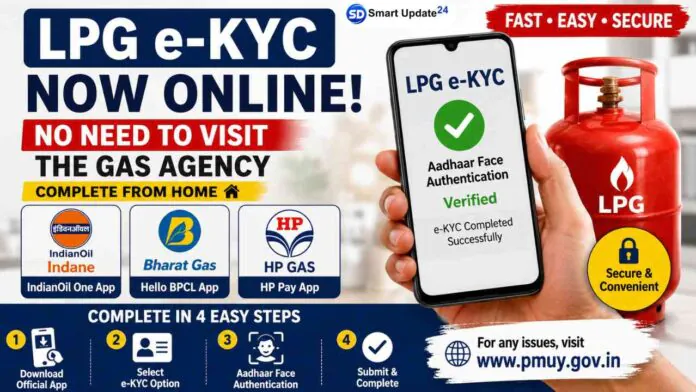
According to the information shared in the image, customers no longer need to visit their LPG distributor’s office for e-KYC. Instead, they can complete the process online using their smartphone.
The digital verification is available for customers of all three major public sector LPG companies:
- Indian Oil (Indane): IndianOil One App
- Bharat Gas (BPCL): Hello BPCL App
- HP Gas: HP Pay App
Consumers simply need to download the official application of their LPG provider and follow the e-KYC instructions.
Why is LPG e-KYC Important?
The government has been encouraging LPG consumers to complete e-KYC to ensure that LPG connections remain linked with genuine beneficiaries. Aadhaar-based verification also helps prevent duplicate or fraudulent connections and improves the efficiency of subsidy-related services.
Completing e-KYC on time may help consumers avoid service interruptions and keep their customer records updated.
How to Complete LPG e-KYC Online
The infographic outlines a simple process that most users can follow:
Step 1: Install the Official App
Download the official mobile application of your LPG provider:
- Indane (Indian Oil) → IndianOil One App
- Bharat Gas (BPCL) → Hello BPCL App
- HP Gas (HPCL) → HP Pay App
Step 2: Download the Official Mobile App
Install the official app from your LPG provider on the Google Play Store or the Apple App Store.
Also install the Aadhaar FaceRD app, which is required for face authentication.
Step 3: Open the LPG App
Launch the app and sign in using your:
- Registered mobile number
- LPG Consumer Number (if required)
- OTP verification
Some apps may ask you to link your LPG connection if it is your first login.
Step 4: Find the e-KYC Option
After logging in, navigate to:
Profile → e-KYC / Aadhaar Authentication / Face Authentication
The exact menu name may vary depending on the LPG company.
Step 5: Enter Aadhaar Details
Provide your Aadhaar number wherever requested.
Ensure that your Aadhaar details belong to the LPG connection holder.
Step 6: Open Aadhaar FaceRD
The LPG app will automatically redirect you to the Aadhaar FaceRD app.
Grant the required permissions:
- Camera
- Internet access
Step 7: Complete Face Authentication
Hold your phone in front of your face.
Follow the on-screen instructions:
- Look straight at the camera.
- Ensure good lighting.
- Remove sunglasses or anything covering your face.
- Keep your face inside the frame until verification is complete.
Step 8: Wait for Verification
The app will verify your Aadhaar details using facial recognition.
If the authentication is successful, your e-KYC will be completed automatically.
Step 9: Confirmation
A success message will appear.
Some apps also update your KYC status under your profile or consumer details.
Step 10: Submit the Verification
Once the face authentication is successful, your LPG e-KYC process will be completed.
What If You Cannot Complete e-KYC Through the App?
The information also mentions that if you are unable to complete the verification through the mobile application, you can use the PMUY official portal for assistance. If technical issues continue, consumers may contact their LPG distributor for support.
Also Read: Pink Card Scheme 2026 | How to Apply for Free Bus Travel on Government Buses
Benefits of Online LPG e-KYC
The online system offers several advantages:
- No need to visit the LPG agency.
- Saves time and travel expenses.
- Faster Aadhaar verification.
- Easy process through official mobile apps.
- Better security with Face Authentication.
- Convenient for old citizens and rural consumers with smartphone access.
Important Things to Remember
Before starting the process, make sure:
- Your Aadhaar is linked correctly.
- You have a stable internet connection.
- Your smartphone camera is working properly.
- You use only the official app of your LPG company.
- Do not share OTPs or personal details with unknown persons.
The introduction of online LPG e-KYC is another step toward making public services more digital and accessible. Instead of standing in long queues at gas agencies, eligible LPG consumers can now complete the Aadhaar-based verification from the comfort of their homes using the official apps of Indian Oil, Bharat Gas, or HP Gas.
Consumers are advised to complete the verification only through official platforms and keep checking updates from their LPG distributor for any future changes.
